Exploring Container Technologies: Beyond Docker
When discussing container technologies, Docker often comes up first. Docker has been pivotal in the containerization movement, but other technologies now exist that might be beneficial for your project. Let's explore some alternatives available in the market.
Understanding Containers vs. Virtualization
Containers are frequently lumped together with virtualization, but there's a fundamental difference. A container is not a virtual machine; think of it as a process that believes it's operating in an optimal isolated environment. We’ll explain the different types of containers.
Types of Container Technologies
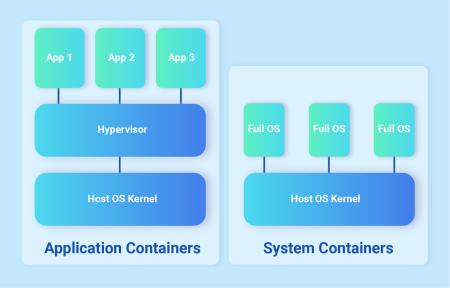
There are two main types of container technologies: application containers and system containers.
- Application Containers: These containers encapsulate a single process or application along with its software dependencies and configuration files. They are inherently stateless, meaning no data is stored in the container after a restart. To store data, you must configure the container to use persistent storage.
- System Containers: Unlike application containers, system containers simulate an entire operating system, allowing multiple processes and applications to run within a single container. They are treated more like virtual machines but use the host system's kernel instead of their own. System containers are stateful, meaning data generated by the container is preserved even after a reboot.
Application Containers
The most well-known application container technology is Docker. Docker revolutionized the use of application containers, which is why it’s familiar to most developers.
Creating Docker containers involves a Dockerfile where you define:
- Dependencies
- The application
- Necessary files
Dockerfiles can be easily shared, ensuring the environment you create will work elsewhere, demonstrating the powerful potential of container technology.
Over the years, drop-in replacements for Docker have emerged to address its shortcomings. One notable alternative is Podman. Unlike Docker, Podman doesn’t run as a single daemon, meaning if the Docker service crashes, all containers crash. Podman avoids this issue and allows non-root users to start containers, enhancing security.
System Containers
For system containers, LXC Containers are a popular choice. They simulate a full virtual machine while using the host’s kernel. You can find LXC container templates for every major Linux distribution, allowing you to use your preferred package manager (yum, apt, pacman, etc.) within an LXC container. Since they are stateful and behave like virtual machines, it’s best to use configuration managers (Ansible, Puppet, etc.) for automation, as LXC doesn’t have a Dockerfile equivalent.
Choosing the Right Container Type
The choice depends on your system management style. If you have experience with virtual machines and tools like Ansible, LXC containers might be easier to fully utilize.
If you prefer building applications with a configuration file where all steps are automated and easily shareable with Git source control, application containers are more suitable for you.
Interesting updates, technical deep dives, quirky visions in the ICT or hosting landscape.
Our colleagues got down to business to give you insight into what's going on at Hosted Power.
This article was written by:
Lennert Hijsselinckx
Cloud Expert